
FME can also do key-based attribute joins. See the course Join Tables.
After completing this lesson, you’ll be able to:
In this course, you'll learn about transformers you can use for spatial joining, filtering, and analysis. These transformers will help you get more value from your spatial data by combining them and running queries across multiple spatial datasets.
Spatial joining is a procedure that combines information between two datasets based on their spatial location. You might be familiar with key-based attribute joins, which join two tables based on a shared attribute. Spatial joins are similar, except instead of using an attribute value as the shared key, they use spatial location.
For example, you might read one dataset of transit stations and one dataset of postcode boundaries. You want to add an attribute to the transit stations that records their postcode. You could use the PointOnAreaOverlayer to join the postcode attributes to the stations based on which postcode each station overlaps. Now, you have a stream of station features that contain the postcode attribute.
FME can also do key-based attribute joins. See the course Join Tables.
Spatial filtering is a procedure that separates features based on their spatial location. In FME, this filtering lets you create multiple data streams and do what you wish with each separate stream.
For example, you might read one dataset of transit stations and one dataset of postcode boundaries. You want to filter your data to select transit stations within a single postcode. You could use the SpatialFilter transformer to produce a data stream containing only those features.
You may need to join before filtering, or you might join after filtering. It all depends on your desired outcome. Combining FME's filtering and joining transformers lets you get your data in exactly the desired shape.
If you are new to joining and filtering, try opening a blank spreadsheet and creating a blank version of your ideal table. What attributes do you need? What does each feature (row) represent? Which set of features do you want in your final table? It can help to visualize this table before setting up your joining and filtering transformers.
Multiple transformers can join data based on spatial relationships. Which transformer you use depends on the spatial relationship to be tested and your exact join requirements. The following are key transformers.
Like the key-based joining transformers, there is a flowchart to help you choose a spatial join transformer. See the Merging or Joining Spatial Data article.
There are several different "overlayer" transformers, each handling a different form of overlaying.
For example, the PointOnAreaOverlayer performs a spatial join on points that fall inside area (polygon) features. This operation is sometimes called a "Point in Polygon" overlay. In set-theoretic terms, overlayers identify the intersection of two streams of spatial features. They return both streams in full but add intersection information as attributes.
As the help explains, "Each point receives the attributes of the area(s) it is contained in, and each containing area receives the attributes of each point it contains."
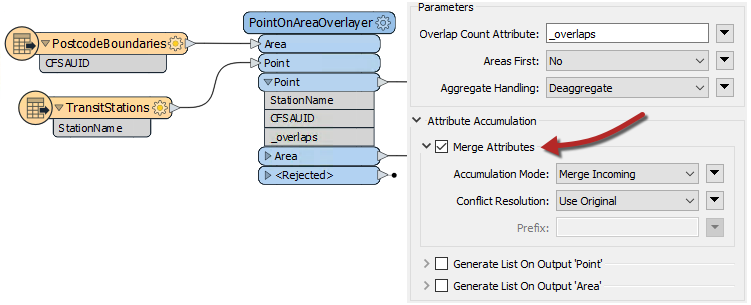
Here, the TransitStation features are provided with a postal code (CFSAUID) that depends on which PostcodeBoundary polygon they fall inside.
The "_overlaps" attribute is another valuable outcome of this transformer. It tells us how many polygons each station falls within; in this case, overlapping postal codes might be identified by a station having more than one overlap.
Conversely, the Area output would have an "_overlaps" attribute indicating how many stations fell within each postal code.
The default behavior of Overlayer transformers is to not merge attributes, but this parameter can be enabled under Attribute Accumulation > Merge Attributes.
The Overlayer transformers only work with vector data. You can accomplish a similar analysis with raster data using transformers like the PointOnRasterValueExtractor.
The NeighborFinder transformer performs a spatial join based on proximity. Here, the NeighborFinder is being used to identify the closest fire hall to each transit station:
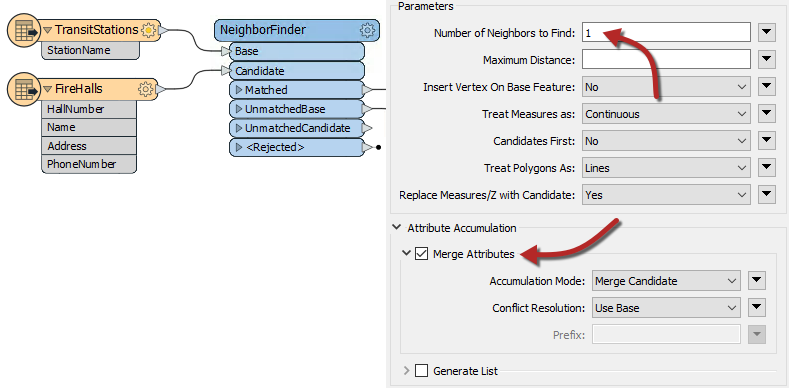
Optionally, the fire hall number, name, address, and phone number attributes are merged with each Facility feature, along with many other valuable attributes (not all shown), recording the X/Y coordinates, direction, and distance to the closest fire hall.
The NeighborFinder parameters include the ability to specify a maximum distance for the relationship or the maximum number of neighbors to find.
The FeatureReader is the spatial equivalent of the DatabaseJoiner transformer. It reads an external dataset and matches based on a spatial relationship between the initiating feature and features in that dataset.
One difference is that the output is not the original feature but the queried feature; hence the name FeatureReader:
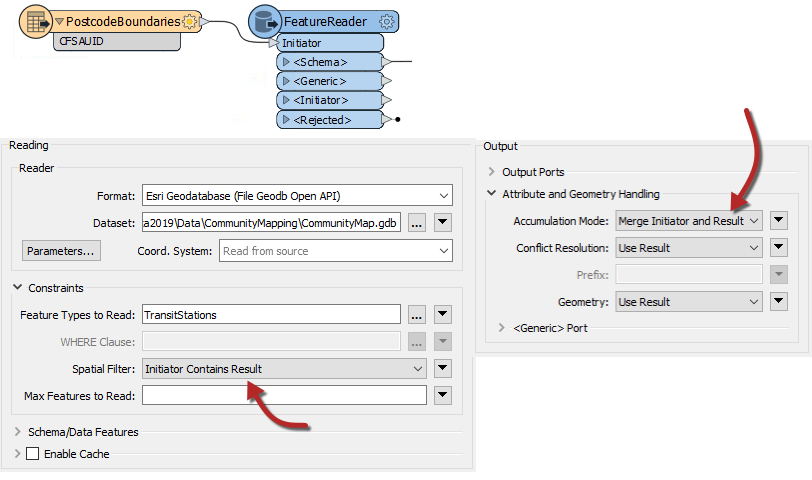
For example, the FeatureReader is used to carry out the same overlay of transit stations and postal codes. The PostcodeBoundaries features are read into the workspace and used to query TransitStations (a table in a Geodatabase) spatially. The stations are retrieved based on the postcode features they fall within.
This also acts as a filter, as stations are not output unless they fall inside the postcode boundary.
As its name suggests, the SpatialFilter filters data according to a spatial relationship. However, it also merges attributes across features, making it a type of spatial join.
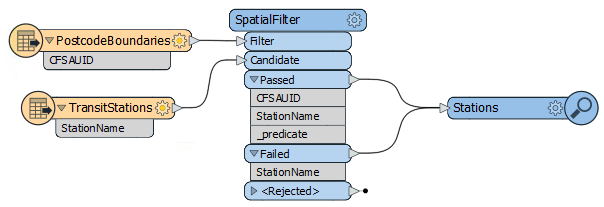
The critical part is connecting both Passed and Failed output ports, unless you also want to filter the data.
Learn more in our Data Integration Basics: Merging & Joining Data webinar.